
How To Create A Data Quality Culture For Your Salesforce Implementation
Data quality is important for any enterprise application, but creating a culture of data quality can be tricky without some strategies

Strong data quality is essential to the success of any Salesforce implementation. One effective way to encourage the right behavior is to reward exceptional data practices and apply appropriate disincentives for poor data quality. In parallel, data integrations can improve efficiency and help strengthen data consistency across the organization. Automation can further extend those gains by reducing manual effort and improving overall process reliability.
A Practical Framework for Data Quality
Companies can manage data quality in Salesforce by following a simple, sequential approach:
Analyze
Plan
Standardize, Cleanse, and Enrich
Automate and Integrate
Maintain
Let’s look at each step in more detail.
Analyze
The first step in managing data quality effectively is to analyze the data. Take time to understand your sources. For example, are you capturing data through Salesforce Web-to-Lead or Web-to-Case forms, or is most of the data entered directly by the sales organization?
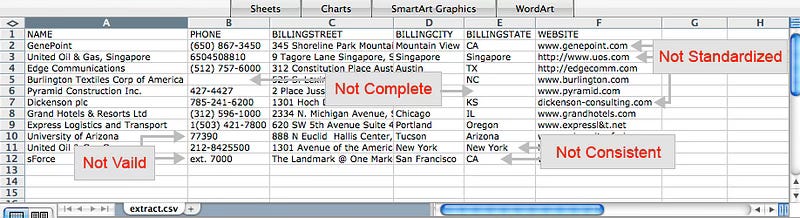
Understanding the source of your data will help you identify its strengths and weaknesses. It is also helpful to assess data quality across key dimensions such as completeness, accuracy, validity, relevance, integrity, standardization, and duplication. Once you establish a baseline rating, it becomes easier to identify problem areas and prioritize improvements.
It is also important to understand how data is mapped and used at both the object level, such as Account, Contact, and Opportunity, and the field level, such as City, State, and Country. This helps prevent duplication and ensures that information is stored consistently across the system.
Plan
A strong data quality program begins with a clear plan. I recommend identifying an executive sponsor who can help secure budget support and drive the initiative forward. It is equally important to assign owners who are accountable for specific areas of data quality. For example, sales managers may be responsible for Account and Contact data, while marketing managers may oversee Lead quality.
Once sponsorship and ownership are established, define and prioritize your goals. These may include targets for completeness, duplication rates, bounce rates, and other key measures. You should also determine how success will be measured and use Salesforce reports and dashboards to create transparency around progress.
A communication plan is equally important. Owners should understand the goals, their responsibilities, and how their performance will be measured. End users who enter data into Salesforce should also be included through kickoff meetings, email updates, or similar communications so they understand the charter, goals, metrics, and incentives.
Standardize, Cleanse, and Enrich
After analysis and planning, the next step is the core of data quality management: improving the data itself. This should be done in a deliberate sequence.
Standardize: Normalize values such as country names, postal codes, phone numbers, and job titles.
Cleanse: Correct bad or missing data, establish naming conventions, and transform data where needed.
Enrich: Add value to existing records through external sources such as Data.com or D&B.
De-dupe: Remove duplicate records and establish an ongoing deduplication process.
Validate: Use a sandbox to test cleansing efforts before applying them in production.
Taken together, these steps help create a more reliable and consistent Salesforce environment.
Automate and Integrate
Organizations can improve efficiency by reducing the number of manual tasks users must perform. Salesforce provides built-in tools such as workflow rules and approval processes to automate standard business activities. Workflow rules can automatically send emails, create tasks, update fields, or send outbound messages based on defined conditions.
Approval processes can also streamline operations. They define the steps required to approve a record and identify who must approve it at each stage. They can also specify the actions to take when a record is approved, rejected, recalled, or submitted for approval.
In addition to automation, integration with other systems can add significant value. Users are more productive when they do not have to move between multiple systems to complete their work. At a minimum, custom links can connect Salesforce with external applications to create a more unified user experience. When designing integrations, Salesforce External IDs are especially useful because they allow the platform to store unique identifiers from external systems.
There are several paths to successful integration in Salesforce:
AppExchange Directory: A strong source of prebuilt solutions and integration tools.
Native Desktop Connectors: Useful for connecting with Microsoft Outlook, Excel, and Word.
Native ERP Connectors: Support common integration scenarios with systems such as SAP and Oracle.
Integration Partners: Vendors such as MuleSoft, SnapLogic, Boomi, Jitterbit, Tibco, and Informatica provide certified connectors and middleware solutions.
Developer Toolkits: Support custom integrations for development environments such as J2EE and .NET.
Maintain
Data quality is not a one-time effort. Even well-designed processes will degrade over time if they are not actively maintained. As a result, maintaining data quality should be treated as an ongoing discipline rather than a short-term project.
There are three best practices for maintaining high-quality
Train and Communicate: Educate users early on naming standards, processes, and duplication avoidance. Reinforce that data integrity is a shared responsibility and communicate how the data will be used. Consider testing and certification programs, along with periodic retraining.
Enforce: Ensure that ownership and sharing rules are properly configured, since ownership plays a major role in preventing poor data practices. Establish policies around mass imports so they do not compromise data quality. An incentive and disincentive model can also help reinforce the right behavior.
Monitor: Use Salesforce reports and dashboards, or third-party AppExchange tools, to monitor data quality over time. Workflow alerts and email notifications can also help keep stakeholders informed.
Data quality is one of the foundations of a successful Salesforce implementation. With the right strategy, governance, automation, and ongoing accountability, organizations can improve both the reliability of their data and the effectiveness of the platform.