
How To Make Salesforce Dashboards A Reality With Your Key Users
Dashboards are a great way to graphically display custom reports data for quick consumption

A dashboard is a collection of components that graphically display custom report data and provide a snapshot of key metrics and performance indicators. Dashboards help users consume large volumes of information in a simple, easy-to-understand visual format. Research has shown that people interpret graphical representations of data, such as charts and graphs, far more easily than rows and columns of raw data.
Dashboards are especially valuable for management teams that need to monitor key performance indicators across the organization in real time. They also help establish a single source of truth for business data. In the past, managers often spent significant time compiling data from multiple systems into spreadsheets and rolling that information up for executive review. Dashboards eliminate much of that manual effort. They are also an effective way to share summary-level information with users while still controlling access to detailed records. For example, support representatives may see overall sales performance without viewing individual opportunities, and regional teams may compare performance across regions without seeing all underlying opportunity data.
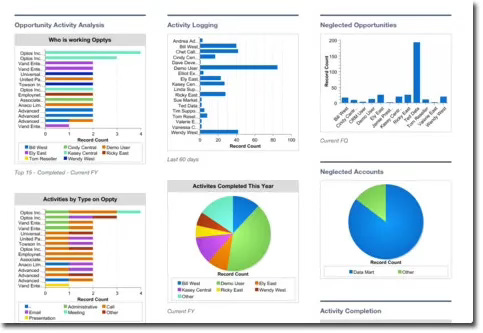
Dashboards also play an important role in building executive support for Salesforce. Executives are busy, and the ability to view sales, marketing, support, and other key information in one graphical format is highly valuable. For that reason, it is worth considering scheduled dashboard emails for executives so critical metrics are delivered directly to their inboxes. This keeps key stakeholders informed quickly and encourages deeper engagement with Salesforce when more detail is needed.
When designing dashboards for users and executives, keep the following points in mind:
Accurate Dashboards and Reports: Dashboards are only as strong as the data behind them. Data quality must be enforced to ensure meaningful reporting.
Data Refresh: When a dashboard is refreshed, the updated data is available to anyone in the organization with access to that dashboard. Additional refresh requests during the process are ignored, and users can continue working in Salesforce while the refresh runs.
The Running User: The running user determines which data appears in a dashboard based on their security access. For static dashboards, all viewers see data according to the running user’s access rights. For dynamic dashboards, the running user can be set to the logged-in user so each viewer sees data based on their own access.
Getting Started with Dashboards
Once you recognize the value of dashboards, the next step is to define which ones will deliver the most business impact. A good starting point is to survey management and key Salesforce users to determine the most important views, regardless of whether the data is already fully captured in Salesforce. Meeting the needs of management and influential users is often critical to building support for the broader Salesforce implementation.
As discussed in a previous post on change management, you can also use the same request channels, such as Cases, Ideas, and Chatter, to collect dashboard requests from users. This creates a structured and visible process for gathering business needs.
The following are the highest-priority areas to consider when starting to build dashboards:
Survey Top Management: What information does the CEO, VP of Sales, VP of Marketing, VP of Support, and other leaders need to run the business effectively?
Survey Top Salesforce Users: Use Salesforce administration reports to identify your most active users. What information do they need on a daily basis? What would make their work easier? What would they want in an ideal environment?
Survey All Salesforce Users: What information would improve day-to-day productivity for the broader user base, such as prospecting data or lead age information?
Data Requirements: Does your Salesforce environment currently contain the data requested by executives and users? You may need to reconfigure Salesforce by adding or updating custom fields, page layouts, workflow rules, or related functionality to support these needs.
I hope this post helps you learn more about how dashboards can strengthen Salesforce adoption and executive visibility. Please feel free to share your thoughts or dashboard best practices in the comments.