
Salesforce HTML Email Tracking Explained
A powerful tool to understand if you're reaching your target audience effectively

One Salesforce capability that many marketers and sales teams value is HTML Email Tracking. It is a powerful way to understand whether outreach is reaching the right audience and generating meaningful engagement. At the same time, it can create confusion if its behavior and limitations are not well understood.
What HTML Email Tracking Does
Salesforce allows users to send HTML emails directly from the platform to prospects and customers. These emails may be simple formatted messages with bold text, colors, and links, or they may be fully designed templates created by your marketing team to promote a campaign, event, or offer.
Once an HTML email is sent, Salesforce can track key engagement details such as the first time the email was opened, the most recent open, and the total number of opens for each recipient. For sales professionals, this information can help prioritize follow-up efforts and focus attention where it is most likely to drive conversion or expansion.
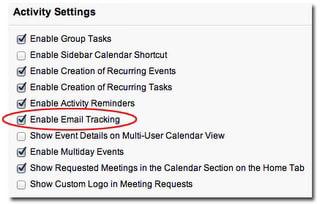
HTML Email Tracking is available across Salesforce editions and can be enabled in two straightforward steps: first, activate the feature in the Activities settings; second, add the HTML Email Status related list to the page layout for Leads, Contacts, or Person Accounts.
How It Works
This feature relies on pixel tracking, sometimes called a web beacon. The concept has existed for years and is widely used across marketing technology platforms to measure email and web engagement.
When an HTML email is sent, Salesforce adds a transparent 1x1 pixel image to the message. The recipient never sees it, but when the email is opened, and images are downloaded by the email client, Salesforce records the open activity. That data is then reflected in the related list for the recipient record.
To review the results, navigate to the Lead, Contact, or Person Account associated with the email and open the HTML Email Status related list.

Important Considerations
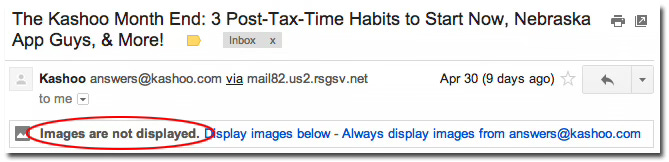
While this is a useful capability, it is important to understand its limitations. Many modern email clients block images by default to protect users’ privacy and reduce unwanted tracking. When that happens, Salesforce may not receive the signal needed to record an open.
One practical way to improve the likelihood of image downloads is to include a clear and visually relevant header image in the email. It is also a good practice to use ALT or TITLE text that encourages the recipient to view images, especially if the email includes branding or promotional content.
Privacy and Ethics
As with any tracking technology, it is worth considering privacy implications and company policy before using the feature. Some recipients may view pixel tracking as intrusive, even though it is common in modern email marketing. The key is to ensure your use of the feature aligns with your organization’s standards, legal requirements, and customer expectations.
Ways To Use It
HTML Email Tracking can be used in several ways within Salesforce:
Sent individually from a Lead, Contact, or Person Account.
Sent through Salesforce Mass Email for Leads or Contacts.
Sent through Web-to-Lead and Web-to-Case auto-response rules.
This gives teams flexibility to track engagement across both one-to-one outreach and broader communication workflows.
HTML Email Tracking can provide valuable insight into prospect engagement when used thoughtfully. My recommendation is to treat it as one input among several, not as a standalone measure of interest, and to pair it with sound judgment and a clear outreach strategy.